
Can OutreachSystems automatically import federal awards data from USASpending?
The answer is YES! However, you should be aware that the key to the federal contract awards import process is the system-defined Unique Entity Identifier (UEI) field on the client record. The only way to have the federal awards data inserted into your database is when a match exists between the UEI number in an award retrieved from USAspending.gov and the UEI number in your Neoserra client record. In the absence of an UEI number, no data can be imported. OutreachSystems does not import UEI numnbers and it is your program's responsibility to add the UEI numbers to the client record.
If you are not currently capturing UEI numbers from your clients, then this may be a field that your administrator enables on both your Neoserra client form and on your eCenter Direct intake form.
Non-DOD federal agencies are relatively timely with their award postings to USAspending.gov. The DOD agencies, on the other hand, are not as timely with their postings. Therefore, each month, OutreachSystems will retrieve all newly posted awards for a rolling 120 day period. In other words, on May 1st we will look for all newly posted awards from January 1st onward. This gives the DOD agencies 120 days to post their information. However, it should be noted that it is ultimately up to each agency as to when they post their contract awards. If the agency does not post the award notification in a timely manner then we also cannot update your client records in a timely manner. You can be assured that we extract all the available data each month, but it is up to the agencies' individual discretion as to when they post their awards.
- Configuration
- Federal Awards Import
- How do I find all imported award records?
- How do I find all imported SBA MPP milestones?
- What happens if I determine that there is a duplicate?
Note that OutreachSystems obtains the federal award information from the USAspending.gov website, not FPDS or SAM.
Configuration
Neoserra offers a special configuration page for the Federal Contract Awards Import process:
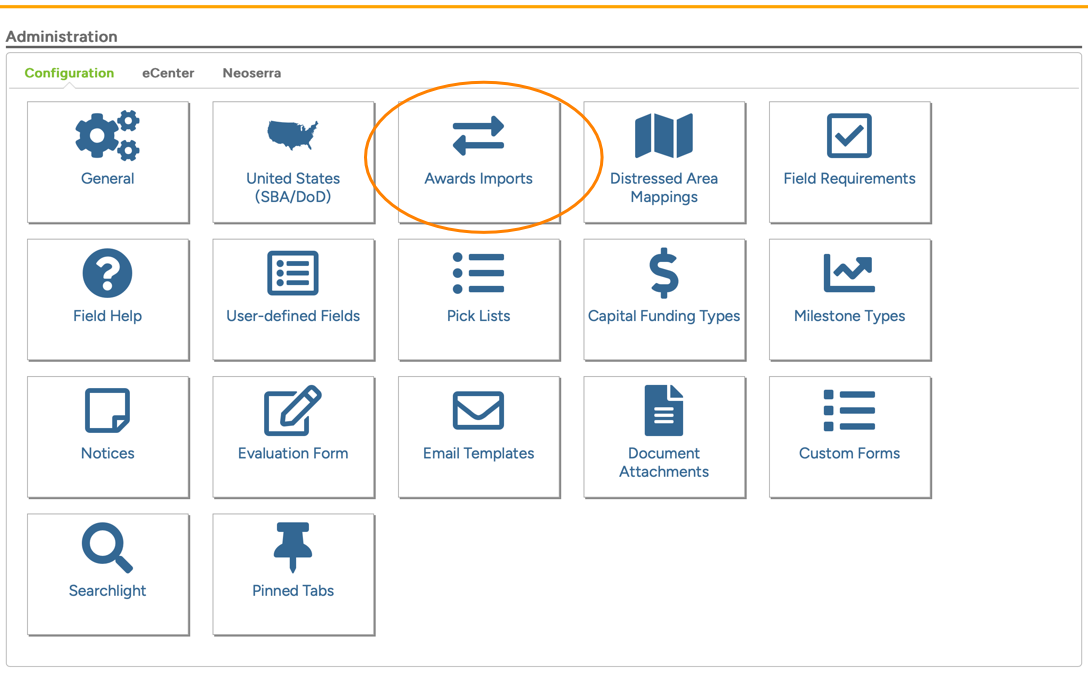
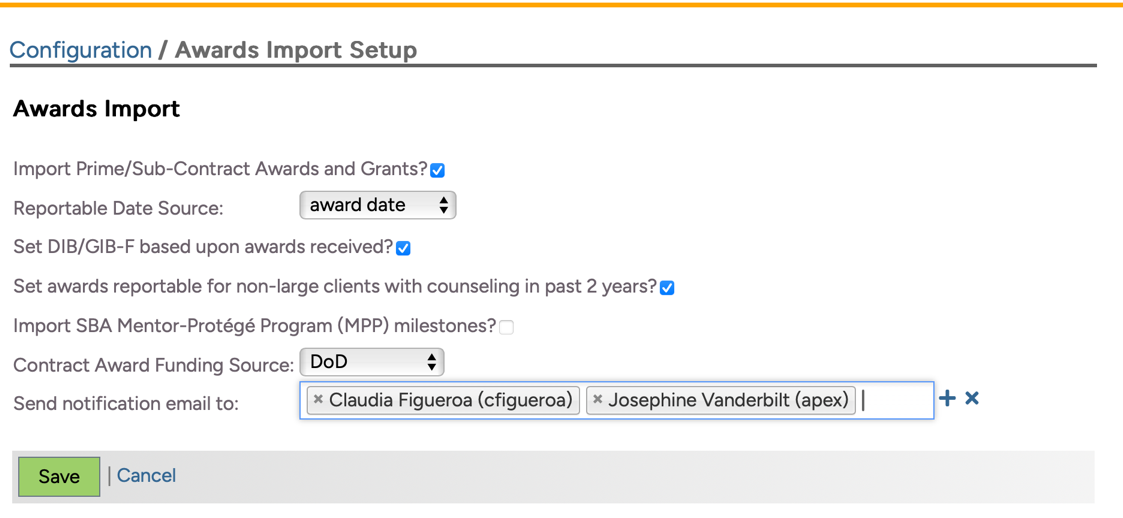
If you wish to participate in the monthly import of Federal Contract Awards, then you will need to check the first option on the page: "Import Prime/Sub-Contract Awards and Grants?":
Turning this option on, will also expose the Manage|Awards Import menu option.
The data is imported from USASpending and matched to your client records based upon the Unique Entity Identifier (UEI) number, a 12-character alphanumeric ID assigned by SAM.gov to entities doing business with the U.S. federal government.
Unchecking this field means that NO awards will be imported during the next month's import process and the Manage|Awards Imports menu option disappears. OutreachSystems initiates the import process generally on the first business day of each month. If you turn this service off, and you miss the start of the month import process, then you will need to wait until the next month for the next import.
NOTE: The "Import Prime/Sub-Contract Awards and Grants?" checkbox does not affect your ability to import the GovSpend awards. If you have purchased this module, then you will be able to import your state and local awards, even if you don't want to import federal awards.
If you do check the option, then you should also verify the remainder of the fields on the page:
- Reportable Date Source: Because the federal government is often delayed in the posting of contract awards, it is possible that you may receive a new contract award record in your database in June but the award was actually issued in March. And, because you may have already reported your prior quarter data to your stakeholders, you can set the reporting date of the imported awards to the date of the import. This allows you to report the delayed awards in a future quarter. Alternatively, you can set the reportable date to the date found within the imported record. Keep in mind that setting the reportable date to the actual award date is not recommended by OutreachSystems, because you WILL periodically miss getting credit for awards that are reported belatedly.
It should be noted that this field also governs the date used for the SBA MPP milestones and the GovSpend import. The SBA MPP milestones are always created one month after they were announced. In other words, on May 10th, OutreachSystems will import the agreements announced in April. With respect to GovSpend, you determine when you import your GovSpend awards, again the date of import most likely will differ from the date of award and we again recommend setting the reporting date to the date of import.
- Set DIB/GIB-F based upon federal awards received?: If you are interested in updating the DIB and GIB-F readiness fields for any client who is not marked as being DIB or GIB-F ready but who just won a DoD or federal award respectively, then you can check this box. The Contract Award Import process will then update the client record and add the readiness date equal to the award date (regardless of what is selected in the field above.)
This configuration setting does not affect the SBA MPP import.
- Set GIB-SL based upon GovSpend awards received?: If you are interested in updating the GIB-S/L readiness field for any client who is not marked as being GIB-S/L ready but who just won a State or local award as part of your GovSpend import, then you can check this box. The Contract Award Import process will then update the client record and add the readiness date equal to the award date (regardless of what is selected in the Reportable Date Source field above.)
- Set awards reportable for non-large clients with counseling in past 2 years: By default this checkbox will be checked and thus the imported awards will be set to Reportable = Yes assuming the client [a] is not marked as a Large business in the "Business Size" field on the client record; and [b] has received reportable counseling in the last two years prior to the import date.
This configuration setting does not affect the SBA MPP import nor the GovSpend import which are always imported as reportable.
- Import SBA Mentor-Protégé Program (MPP) milestones?: By checking this option, OutreachSystems can create a SBA Mentor-Protégé Program (MPP) Agreement milestone when there is a match between the UEI number in the SBA spreadsheet and the UEI number in the system-defined fields on the Neoserra client records. OutreachSystems is not responsible for any errors in the data provided by SBA, nor can OutreachSystems eliminate potential duplicate milestone that may already exist in your database. The milestone date will be set based upon the "Reportabe Date Source" referenced above. Since SBA updates the spreadsheet around the 6th or 7th day each month, OutreachSystems processes the file on the 10th of each month to ensure we always receive the most up to date file, and the results will be posted in a separate batch from the awards records. It should be noted that the SBA MPP milestones will always be imported as reportable records.
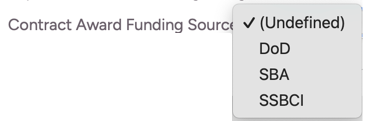
- Contract Award Funding Source: You can select the funding source to be assigned to all contracts awards and milestones imported. The funding source specified here will also be used for the SBA MPP import.
- Send Notifications email to: Upon completion of either the awards or SBA MPP import process, OutreachSystems will notify the users identified within this field that the process is complete. You can add as many Neoserra users as desired, but they must have a user account in Neoserra. There is no notification upon completion of the GovSpend import since this process is initiated by you (not OutreachSystems).
Federal Awards Import
The imported award records will be mapped from the USAspending.gov data as follows:
| Field in Neoserra | Field in USAspending.gov Data | |
| Client | Client is identified based upon UEI number in the federal award notification. In the absence of a UEI number in the client record, Neoserra will not be able to match the awards. If you have a client whose awards data you do NOT want imported, but you don't want to delete their UEI number from the database, then you can add an asterisk to the front of the UEI number to avoid a match. The UEI number must match perfectly in order for award records to be added. This also means you should not add any dashes or slashes to the UEI number field in Neoserra. | |
| Counselor | The default counselor for the client will be used in the awards record | |
| Award Date | The information comes from the 'signeddate' field found in the USAspending.gov data | |
| Reporting Date | By default, this date will be set to the day of the import, which usually will take place on, or around the first business day of each month. However, you may edit the "Reportable Date Source" configuration setting on the Awards Imports page as discussed above. Again, please note that the risk of using the "Date in imported record" is that the actual award date may be in a prior reporting period which can cause the award to be excluded in your current reporting period.
| |
| Contract Type | This will always be set 'Prime Contract Award' for all imported Prime or Grant records; and it will be set to 'Sub-contract Award' for all sub-contracts. | |
| Agency Name | This information comes from the 'contractingofficeagencyid' field found in the USAspending.gov data | |
| Agency Type | This will be set to 'Other Federal' unless the 'maj_fund_agency_cat' is Department of Defense in which case, this field will be set to DOD | |
| Contract Number | This information comes from either 'piid' or the 'idvpiid' when piid is blank + 'modnumber' fields found in the USAspending.gov data | |
| Award Amount | This information comes from the 'dollarsobligated' field found in the USAspending.gov data. OutreachSystems will only import positive value amounts. In other words, if a contract is listed with a zero value or even a negative value then this award will not be imported. | |
| Number of Awards | This is always set to 1 | |
| Information Source | This is always set depending upin the data source:
| |
| Comments | This is always set to 'Imported from USAspending.gov by OutreachSystems' | |
| Center | This is always set to default center for the client | |
| Funding Source | This is always set based upon your configuration setting on the Awards Imports page discussed above.
| |
| Notes | This information comes from the 'descriptionofcontractrequirement' field found in the USAspending.gov site | |
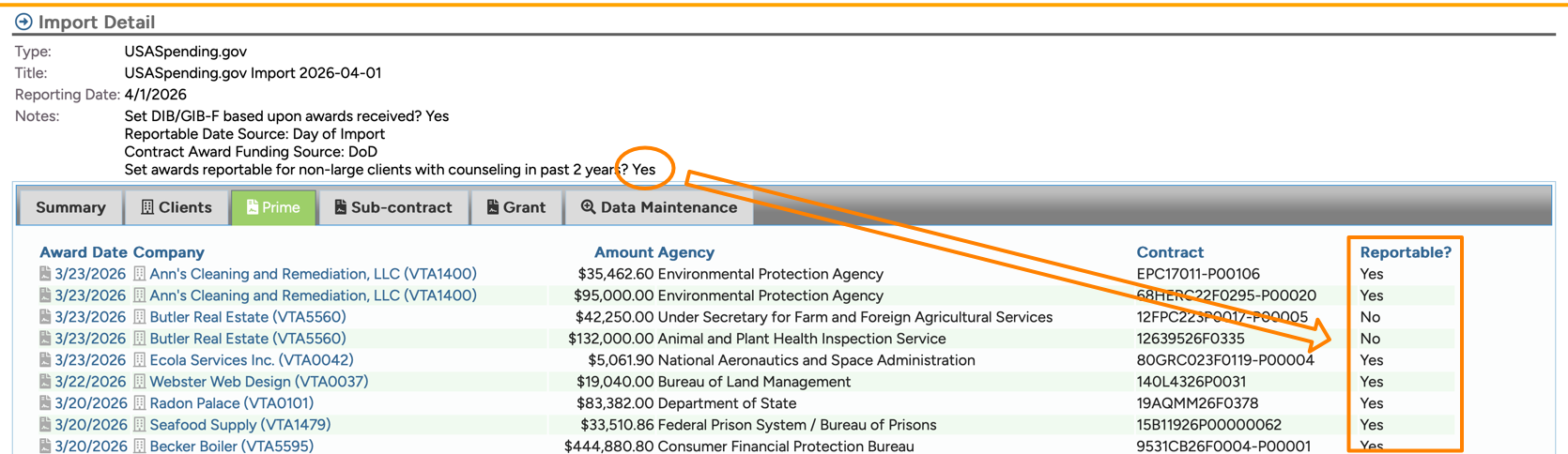
| Reportable | The default will be to set the imported awards records to reportable assuming the client is not a large business as indicated in the Business Size field on the client record AND assuming the client has had reportable counseling in the past two years prior to the date of import. You can elect to import the awards as non-reportable by editing the Awards Import Configuration page.
| |
| Affirmation/Attribution | These fields are always left blank |


Special note for databases including non-APEX centers
If your Neoserra database includes non-APEX centers, such as WBC centers, SBDC centers or other EDC programs, then you should be aware that this process will affect ALL client records in your database. In other words, if a client in an SBDC center has a UEI number in their client record, and one of the numbers matches an award record in the USAspending.gov data set, then this non-APEX client will also be updated with the corresponding award record.
Why? Because it may be that this SBDC client is also being counseled by the APEX Accelerator even though their main center is an SBDC center. Furthermore, this non-APEX client may, in fact, present a new opportunity for the APEX Accelerator. In other words, this may be a marketing opportunity for the APEX Accelerator to offer their services to this government contractor who previously was unknown to them.
However, OutreachSystems does not believe that many non-APEX clients will be affected by this process because most non-APEX programs will not collect UEI numbers for their clients, and the UEI number is the key for the update to take place.
How do I find all imported federal award records?
Assuming you have checked the "Import Prime/Sub-Contract Awards and Grants?" checkbox on the Awards Import Configuration page, then you will see a "Awards Import" menu option under the Manage menu:
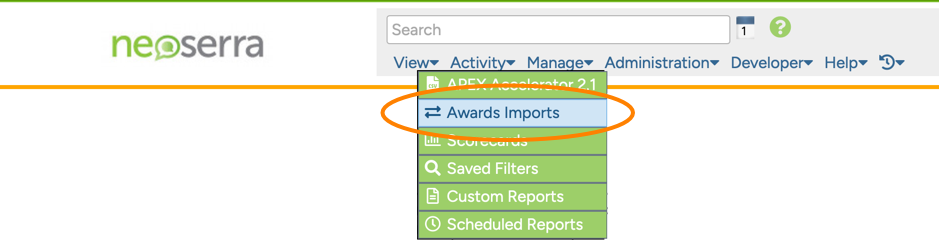
Selecting this menu item will show you all imports that have taken place over time:

You can click on the most recent import to see the updates made to your database:
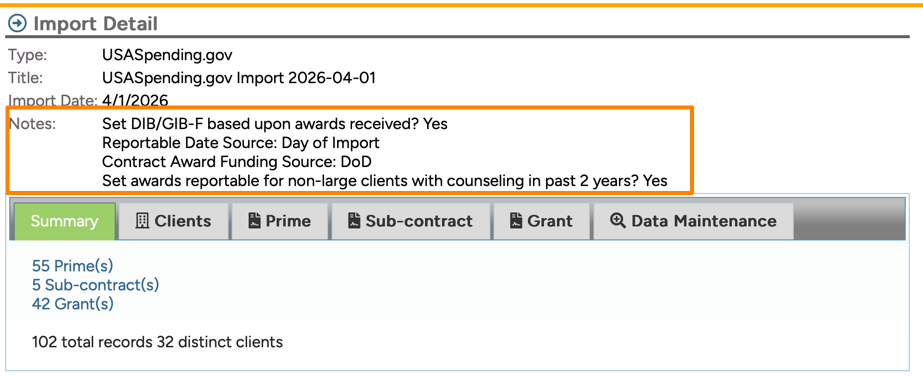
At the top of the page you will see the settings that the import is based on. Of course, the import will ONLY take place if the "Import Prime/Sub-Contract Awards and Grants?" configuration setting has been turned on. The import process runs around the first business day of each month (depending upon weekends/federal holidays). Assuming the checkbox is set when OutreachSystems initiates the next import process, then the awards will be imported into your database assuming there is an UEI match between your client(s) and the federal awards.
In the "Notes" field on this page you will see the settings from the Awards Import Configuration page at the time of the import. Keep in mind that changing the settings does not change the prior imports!
You will notice several tabs where you drill deeper into the import specifics:
- Summary: The first tab will give you a summary overview of the records imported into your database.
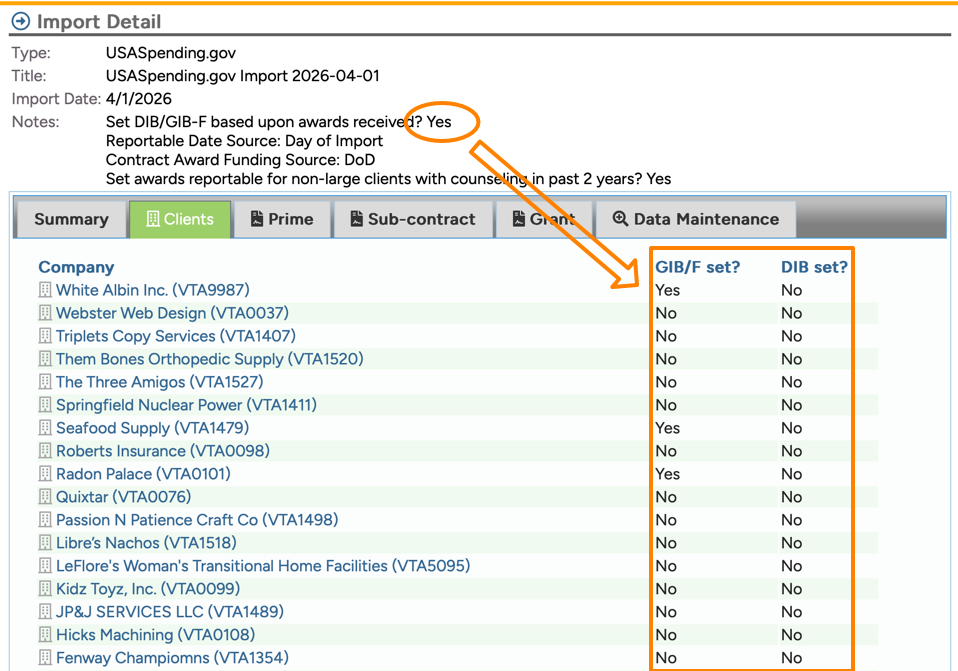
- Clients: The "Clients" tab will provide you with a listing of all clients who received either a prime or sub-contract award or who received a grant. On this page, you will also see if their DIB or GIB-F fields were updated on their client record. Keep in mind that this only happens if you have turned on the "Set DIB/GIB-F based upon awards received?" configuration setting and even then the field will only be updated for any client who is not already marked as being DIB or GIB-F ready, but who just won a DoD or federal award respectively:
- Prime: The "Prime" tab will show you all contract awards that were imported. The awards will be set to reportable for all non-large clients with activity in the last two years assuming you have set the configuration setting accordingly:
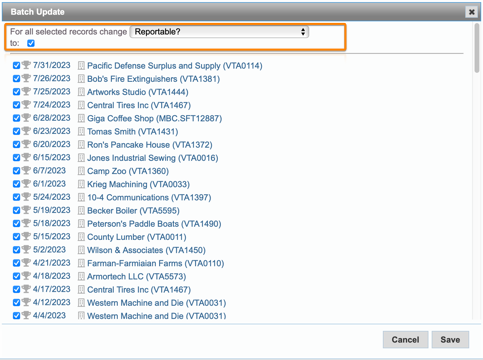
If you choose to update the "Reportable" field yourself then you will need to create your own filters under the Activity|Contract Awards menu option to identify the records that need to be changed to Reportable. You can either change them manually, one-by-one or you can use the Batch Update functionality to change the "Reportable?" field to "Yes" as discussed in this FAQ. Do keep in mind that the batch update process is not reversable:
- Sub-contracts: The "Sub-contracts" tab is similar to the "Prime" tab except it only lists the sub-contract awards that were imported.
- Grants: The "Grants" tab is similar to the "Prime" tab except it only lists the grants that were imported.
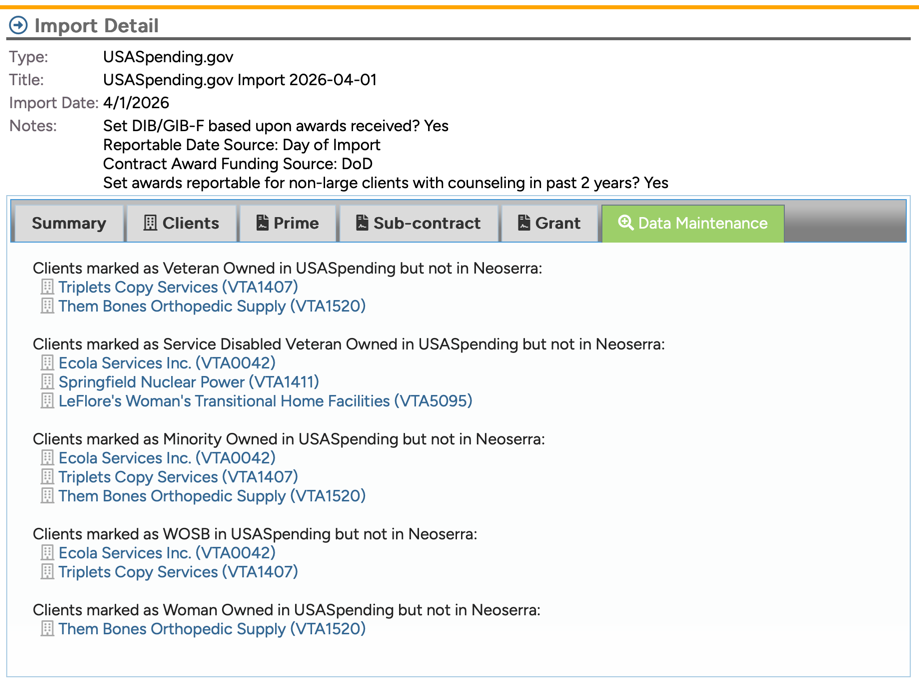
- Data Maintenance: The Data Maintenance page is informational only! No changes have been made to your database based upon the information displayed on this page. The purpose of this page is to let you know which clients show socioeconomic certification(s) in USASpending that are not reflected in your Neoserra database. You will need to decide if you want to contact these clients to determine their current and correct socioeconomic status and then update their record accordingly:
How do I find all imported SBA MPP milestones?
On the 10th day of each month, OutreachSystems will run a separate process and create SBA MPP milestones for those Neoserra databases where the "Import SBA Mentor-Protégé Program (MPP) milestones?" checkbox has been checked on the Awards Imports Configuration page.
This process will create a separate batch under the Manage|Awards Imports menu option where you will be able to see the milestones created:
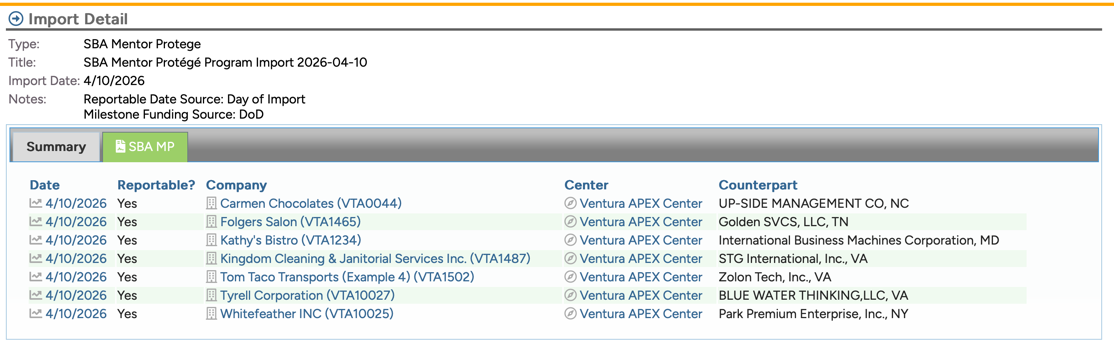
The milestones will be imported using the date selected under the "Reportable Date Source" configuration setting and the funding source per the "Funding Source" field on the Awards Imports configuration page. The milestones will always be marked as reportable.
What happens if I determine that there is a duplicate?
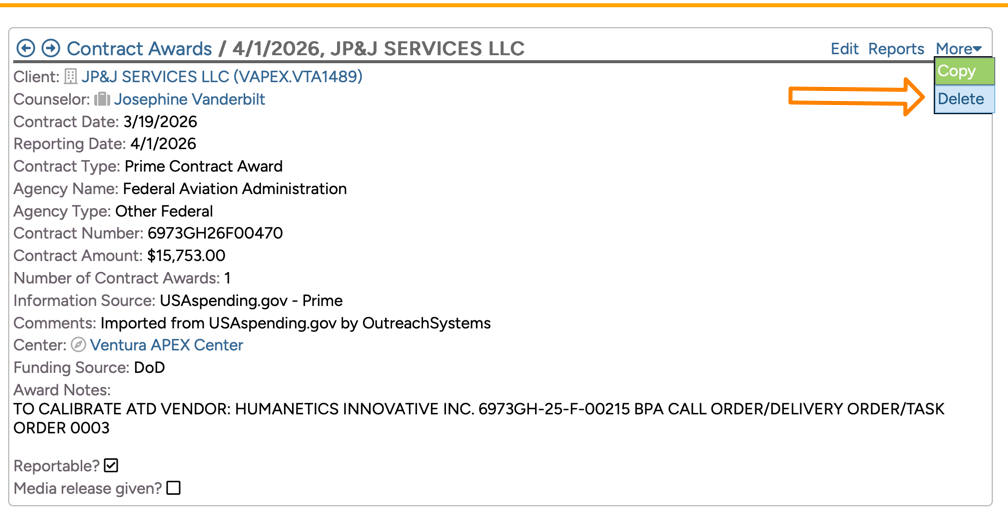
As you review the imported data and if you encounter a record that is a duplicate of a record that already exists in your database, then you can choose to delete one of the two records simply by going to the award record and clicking the More|Delete menu option:
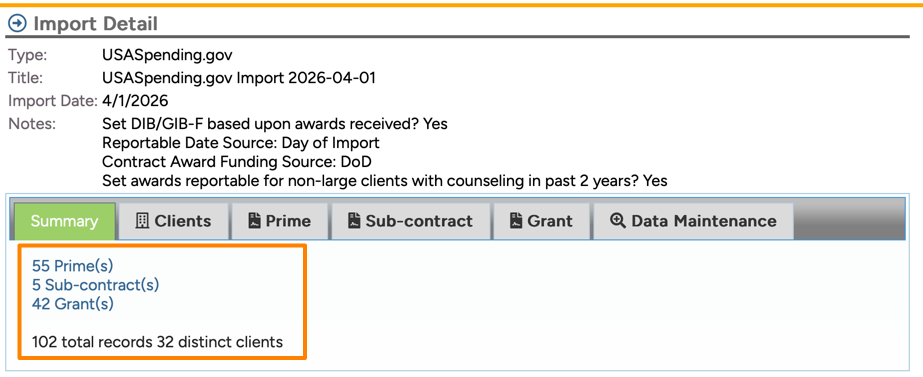
NOTE: When you delete an imported record it will remove the record from your database, however it will NOT update the Summary page of the Awards Import interface. In other words, if 55 prime contract award records were imported and you manually delete one, then Neoserra will still report that 55 prime contract award records were imported, while your filter may only show 54 awards:
Your ability to delete records is dependent upon your permissions. You will need to contact your database administrator for any changes that need to be made to your permission settings.
Want more? Browse our extensive list of Neoserra FAQs.