
How can I import state/local awards from GovSpend?
It is important to realize that OutreachSystems does not have a GovSpend subscription thus you will need your own subsciption and retrieve the contract awards yourself from GovSpend.
GovSpend Module
OutreachSystems offers a GovSpend module that allows you to import GovSpend awards for your clients. Unfortunately, the team at OutreachSystems is not familiar with GovSpend, and you will need to retrieve your clients' awards based upon the instructions provided by GovSpend. The module provided by OutreachSystems can help import the GovSpend awards into Neoserra, however, it is your responsibility to retrieve the awards in the specified Excel format that Neoserra can process (only .XLSX format is supported.) The module uses the same confirguration page as the importing of federal awards from USASpending.gov. You should verify the settings on this page before you proceed with your first GovSpend import.
The GovSpend Import module is available for a one time fee of $600.00. Once the module has been installed in your Neoserra database, then you can import your GovSpend awards as often as you want.
GovSpend Mapping
When you extract your data from GovSpend you will want to create an Excel file in the .xlsx Excel file format. The .csv or .xls formats are not supported. The Excel file must include the following columns using header names that match below. The order of the columns does not matter, but the file must include the following columns with the column names (or the alternative names) shown in the table. Do not include the Reporting Date since this is determined based upon your settings on the Administration|Configuration|Awards Import page:
| Column Name | Alternative Name #1 | Alternative Name #2 |
| Company Name | Client Name | - |
| Agency Name | - | - |
| Date | Award Date | Issued Date |
| Amount | Price | - |
| Description | Notes | - |
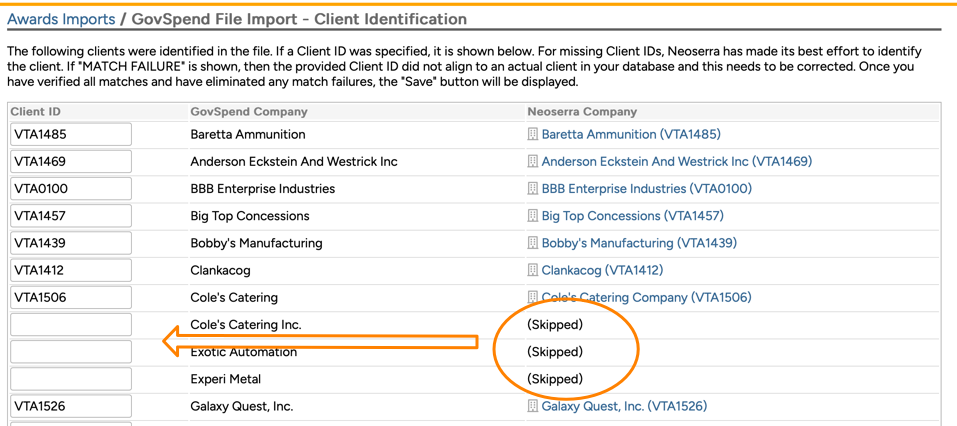
You may optionally include a column for the "PO Number" or "Contract Number" but this is not necessary. If it is included then the information from this column will be mapped to the Neoserra "Contract Number" field on the awards record. As noted above, you should not include the Reporting Date in the file since this is determined based upon your configuration settings. Also, the Neoserra Client ID does not need to be added to the GovSpend file. Neoserra will automatically match the GovSpend company name to the corresponding Neoserra client record by looking at both the Company Name field in Neoserra and the DBA field. It is recommended that you enable the DBA field and use this field for alternate company names that may appear in GovSpend, to improve your match rate. If Neoserra is unable to find a match, then you will see that the record is set to be "(Skipped)". If you want to import the awards for this company, then it will be up to you to find the correct Client ID and put it in the Client ID column. If no Client ID is added by you, then the award will be skipped during import:
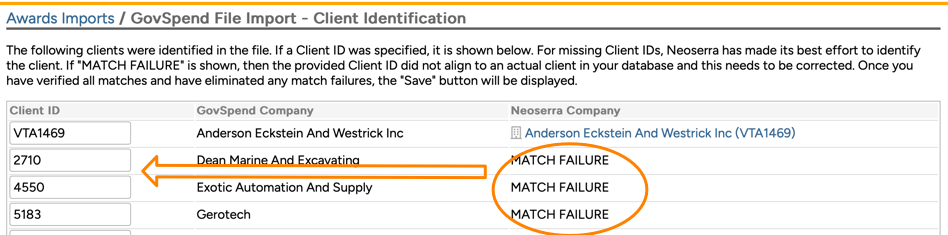
If you do add a Client ID column in your GovSpend file and you provide a Client ID that does not exist in Neoserra then you will see a "MATCH FAILURE" error, which must be resolved before you can proceed. Basically you are asking to import award records to a Client ID that is not found in Neoserra. You can either remove the ID from the Client ID column in which case the record will be skipped, or you can put in the correct Client ID.
Lastly, the GovSpend file must adhere to proper formatting. The columns may not overflow into other columns; the dates must be in a mm/dd/yyyy format; the amount must have the format of $9,999.99. If the formatting does not comply, then you will see a parsing error similar to this one:

The file should, of course, only include one sheet. Neoserra will only parse the first sheet in the file that it finds:

Certain defaults will always be applied for every State/Local record imported from GovSpend:
| Field in Neoserra | Default Import Valie |
| Counselor | The default counselor for the client will be used in the awards record |
| Contract Date | The Contract Date will be populated with the date provided in the GovSpend Excel file. It is important that you do not provide more than one date column in the file since Neoserra will always use the first date column it encounters for the Contract Date. |
| Reporting Date | This date will be set based upon your Awards Import configuration settings found on the Administration|Configuration|Awards Import page:
Note that the risk of using the "Date in imported record" is that the actual award date may be in a prior reporting period which can cause the award to be excluded in your current reporting period. |
| Contract Type | This will always be set to 'Prime Contract' for all imported records. |
| Agency Name | The Agency Name will be populated with the information provided by GovSpend. |
| Agency Type | This will be set to 'State/Local' for all imported records. |
| Contract Amount | The Contract Amount will be populated with the information provided by GovSpend. |
| Number of Awards | The Number of awards will always be set to 1. |
| Information Source | The Information Source will always be set to GovSpend. |
| Comments | This is always set to 'Imported from GovSpend' |
| Center | The Center is set to match the Center that the client belongs to. |
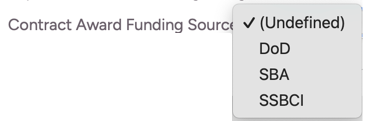
| Funding Source | This is always set based upon your configuration setting on the Awards Imports page found under the Administration|Configuration menu:
|
| Notes | The Notes will be populated with any information provided in the GovSpend file in the Notes or Description column. |
| Reportable | This is always set to Yes regardless of what you have configured on the Awards Imports page. |
| Affirmation/Attribution | These fields are always left blank |

GovSpend Import
As noted previously, OutreachSystems is not able to assist in the creation of the GovSpend award file. You will need to follow the instructions provided by GovSpend to create the Excel file for import into Neoserra. Assuming that you have created a file with the following columns, then you are ready to start the import process:

Again, the columns don't have to be in the same order, but all of these columns must be present in your file and you must conform to the same column names, or the alternative names, as we have listed above.
Go to Manage|Awards Imports and select the "Import|Import GovSpend" menu option:

Neoserra will present you with the Client Identification window. Keep in mind that a client may appear multiple times in the file, but they will only appear here once for identification purposes. Any company name in the GovSpend file that matches a Neoserra client record will be shown as a match; any company name in the GovSpend file that does not match a Neoserra client record, will be "(Skipped)" unless you add the correct Client ID in the corresponding field:
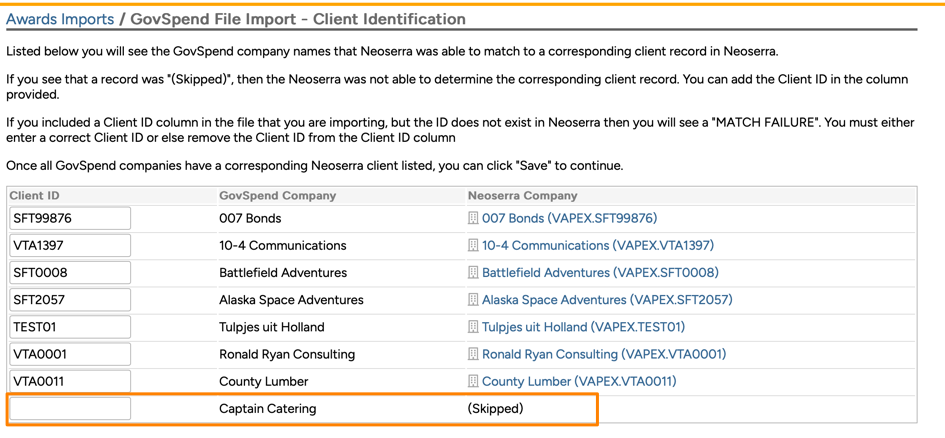
Neoserra will not be able to create a match if you have corresponding duplicate records in Neoserra. As with many other functions in Neoserra, duplicates will cause problems! In other words, if ABC Company in the GovSpend file matches to two duplicate clients in Neoserra, and both clients are in active centers (excluding the Stakeholder center since we will never match awards to stakeholder records), with the exact same name as is found in the GovSpend file, then Neoserra will skip the match and it is up to you to enter the correct Client ID.
Assuming you have matched up all your GovSpend companies with your Neoserra clients, then you can click "Save" to process the file. Upon completion you will see the Import Detail page where you will see the three tabs providing you an overview of the imported data:
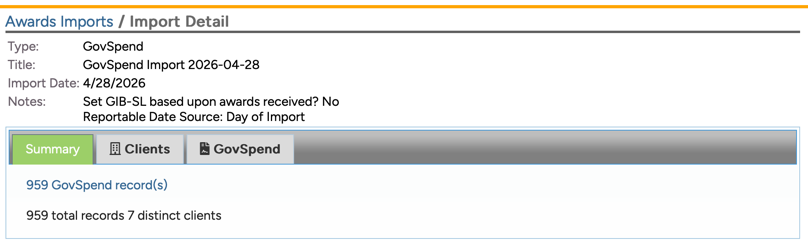
- Summary: The first tab will give you a summary overview of the records imported into your database. This is a summary of the import process. When you delete an imported record it will remove the record from your database, however it will NOT update the Summary page of the Awards Import interface. In other words, if 55 GovSpend award records were imported and you manually delete one, then Neoserra will still report that 55 GovSpend award records were imported, while your filter may only show 54 awards.
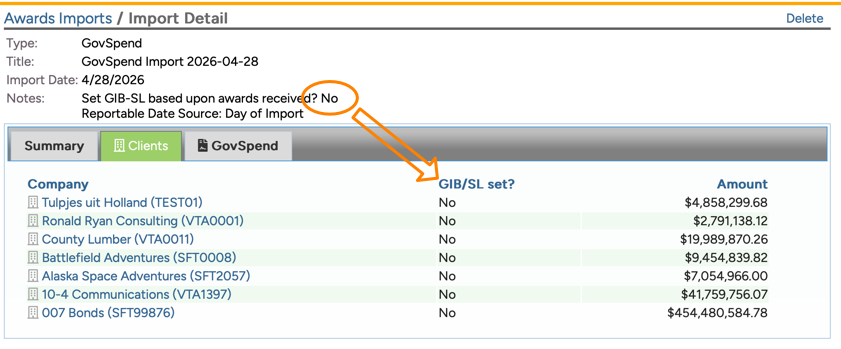
- Clients: The "Clients" tab will provide you with a listing of all clients who received a State or Local award. On this page, you will also see if their GIB-S/L field was updated on their client record. Keep in mind that this only happens if you have turned on the "Set GIB-SL based upon GovSpend awards received?" configuration setting and even then the field will only be updated for any client who is not already marked as being GIB-S/L ready, but who just won a State/Local award:
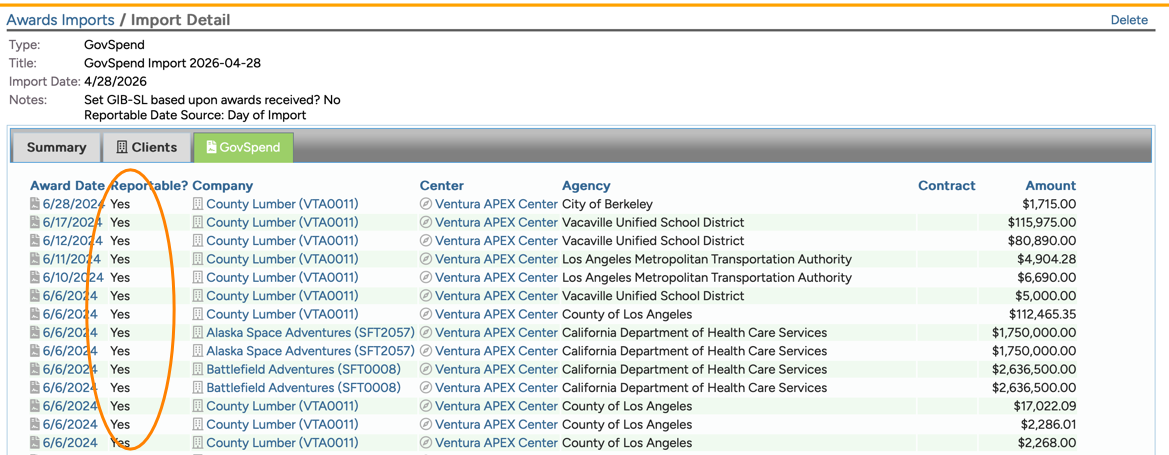
- GovSpend: The "GovSpend" tab will show you all contract awards that were imported. The awards will always be set to reportable:
Want more? Browse our extensive list of Neoserra FAQs.